
How To Delete PUBG Account – Easy Guide
PUBG (Playerunknown’s Battlegrounds) has wreaked havoc on the gaming sector in recent years, and while the number of players worldwide has surpassed millions and interest continues to grow with each passing day, you may want to delete your account completely. This is how you can delete your PUBG account.
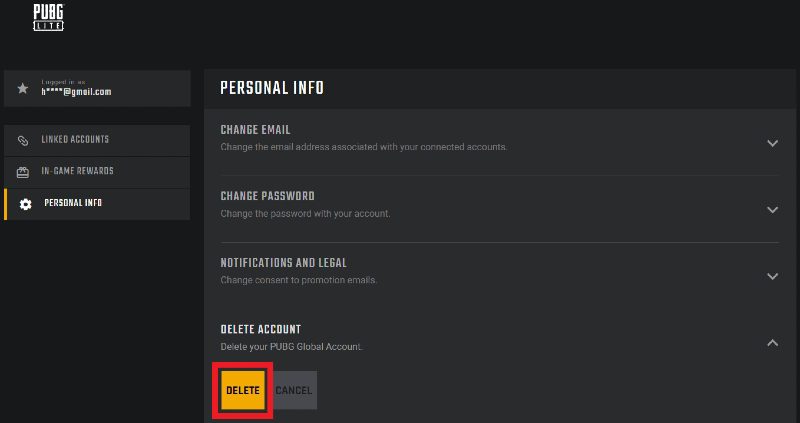
Delete Account On PC
- Log in to your account.
- Go to this site:
- https://accounts.pubg.com/
- Select ” Remove Account” from the drop-down menu.
- Enter your password to confirm.
- Click “Delete”.
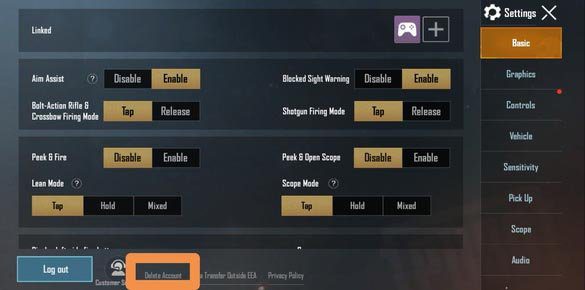
Delete PUBG Mobile Account
- Open PUBG Mobile on your device.
- Select Setting (gear icon) on the lobby screen.
- Tap “Basic”.
- Select on “Delete Account”.
Unlink Google Play Account
- Go to Settings App
- Tap Google
- Select Account Services
- Under Accounting Services, tap Connected Apps.
- Scroll through PUBG Mobile and tap on it.
- Select Disconnect.
Unlink Facebook Account
- Log into your Facebook account.
- Head to Settings.
- Select Application & Websites.
- Click Delete next to the application.
So that concludes this article. I hope you enjoyed this article and that it was able to assist you in effectively deleting your PUBG (Playerunknown’s Battlegrounds) account and disconnecting it from your social networks!
If you have any questions regarding PUBG (Playerunknown’s Battlegrounds), feel free to ask in the comments below. For more content related to PUBG (Playerunknown’s Battlegrounds), stay with us, here at Spiel Times.
Make sure you subscribe to our push-notifications and never miss an update from the world of video games. Until next time, Stay Safe, Wear A Mask, and Happy Gaming!
7 Comments
Leave a Comment

JC Paredes
Since March 2021, I've worn two hats at Spiel Times: a writer and a Managing Editor. In my writing role, I've earned recognition from Wikipedia and Nev Schulman (Catfish TV Show host) for my insightful analysis and engaging narrative style. I'm passionate about all things gaming, with a keen eye for detail and a knack for uncovering hidden secrets within games. My gaming journey began at a young age, captivated by titles like Resident Evil and Tomb Raider. Today, I enjoy exploring open-world RPGs and MMORPGs, consumed by their lore and crafting theories about their narratives. I'm also drawn to the suspenseful atmosphere of horror games and the intricate narratives of crime-themed titles, bringing a unique perspective to my writing. Beyond gaming, I have a fascination with anything unexplained and chilling, a passion that often spills over into my exploration of horror games. When I'm not engrossed in a virtual world, you can find me curled up and spending time with my adorable doggy sidekick, Teemo. As Managing Editor, I'm committed to fostering a collaborative and supportive environment for our writing team. I communicate openly with my team members, addressing any content-related issues and providing guidance to help them excel.
View all articles
While trying to transfer my account from pubg to bgmi, it says that mine is ineligible for transferring.I’ve linked both twitter and Facebook.
Fk scaling ex kdn
how can I delele Pubg Vietnam account ?
My pubg account kr facebook
Delete
Delete account in my account
Delete all account in my page