How To Delete PUBG Account – Easy Guide
PUBG (Playerunknown’s Battlegrounds) has wreaked havoc on the gaming sector in recent years, and while the number of players worldwide has surpassed millions and interest continues to grow with each passing day, you may want to delete your account completely. This is how you can delete your PUBG account.
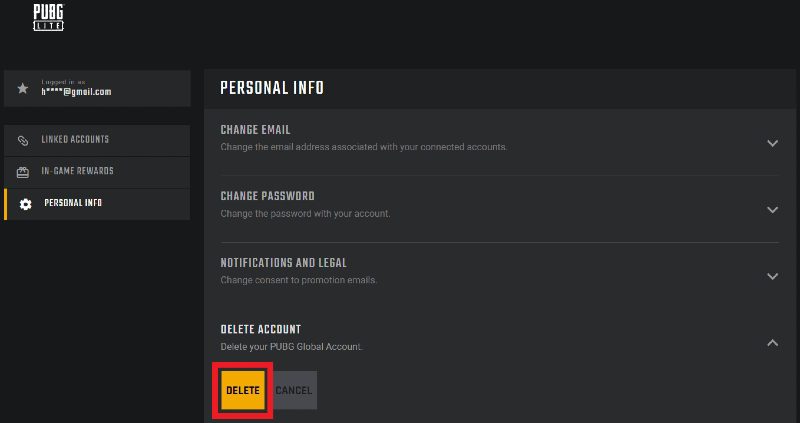
Delete Account On PC
- Log in to your account.
- Go to this site:
- https://accounts.pubg.com/
- Select ” Remove Account” from the drop-down menu.
- Enter your password to confirm.
- Click “Delete”.
Delete PUBG Mobile Account
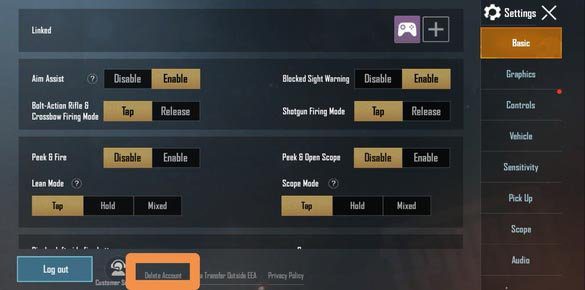
- Open PUBG Mobile on your device.
- Select Setting (gear icon) on the lobby screen.
- Tap “Basic”.
- Select on “Delete Account”.
Unlink Google Play Account
- Go to Settings App
- Tap Google
- Select Account Services
- Under Accounting Services, tap Connected Apps.
- Scroll through PUBG Mobile and tap on it.
- Select Disconnect.
Unlink Facebook Account
- Log into your Facebook account.
- Head to Settings.
- Select Application & Websites.
- Click Delete next to the application.
So that concludes this article. I hope you enjoyed this article and that it was able to assist you in effectively deleting your PUBG (Playerunknown’s Battlegrounds) account and disconnecting it from your social networks!
If you have any questions regarding PUBG (Playerunknown’s Battlegrounds), feel free to ask in the comments below. For more content related to PUBG (Playerunknown’s Battlegrounds), stay with us, here at Spiel Times.
Make sure you subscribe to our push-notifications and never miss an update from the world of video games. Until next time, Stay Safe, Wear A Mask, and Happy Gaming!
Leave a Comment

Marcus Kade
Marcus Kade is Managing Editor at Spiel Times, covering breaking gaming news with a focus on the industry's business side. When not writing, he's probably losing a co-op game to his partner.
View all articlesRelated Articles
View All
Plug In Digital Buys Twin Sails to Expand Indie Games’ Global Reach
Plug In Digital’s acquisition of Twin Sails Interactive, announced on November 23, 2026, brings two complementary businesses together under one...
Caladrius2’s Delay Pushes Its Gothic Shooter Into 2027’s Shmup Rush
Caladrius2/Dark Element has moved out of 2026, giving the gothic bullet-hell sequel a new position in an active shoot-em-up calendar....

Take-Two Reaffirms Its $8 Billion Net Bookings Goal as GTA VI Nears
Grand Theft Auto VI is nearing its November 19 launch on PlayStation 5 and Xbox Series X|S. Its release marks...
While trying to transfer my account from pubg to bgmi, it says that mine is ineligible for transferring.I’ve linked both twitter and Facebook.
Fk scaling ex kdn
how can I delele Pubg Vietnam account ?
My pubg account kr facebook
Delete
Delete account in my account
Delete all account in my page