
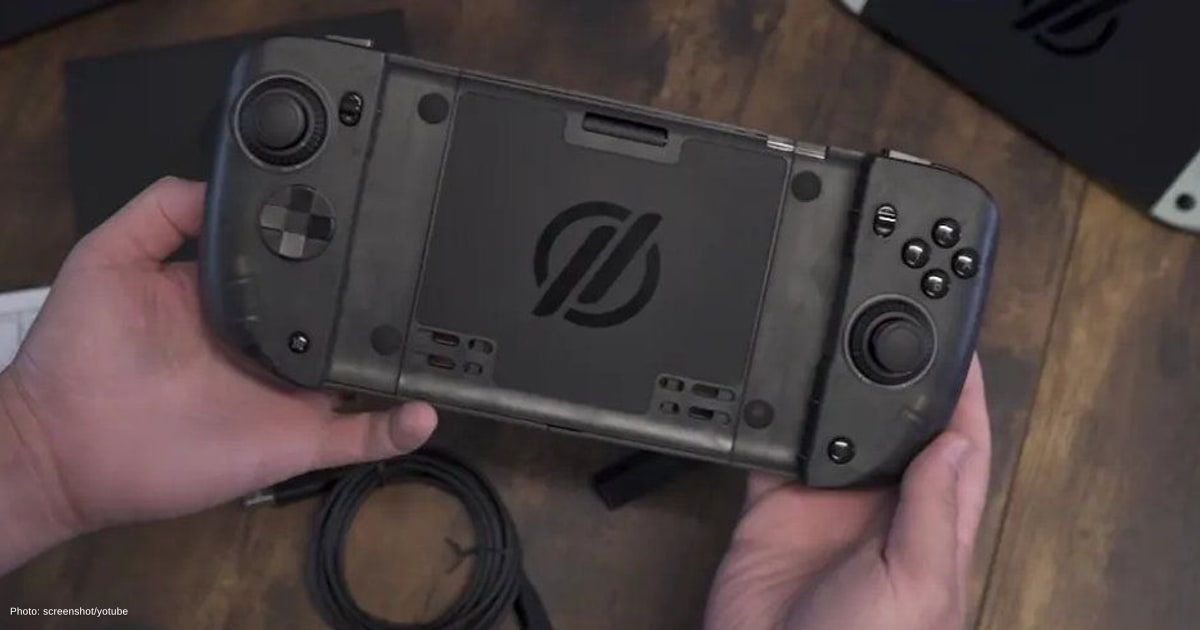
Crkd Nitro Deck 2 Brings New Switch 2 Features, but One Flaw Spoils the Experience
Handheld gaming has come a long way, and players now have plenty of accessories promising to make their favourite consoles more comfortable and enjoyable. From improved grips to customizable controls, these add-ons can make a real difference to the portable entertainment experience.
However, fancy features mean little when something as simple as button placement gets in the way of the action. That’s the problem facing Crkd’s latest controller accessory, which brings some welcome upgrades but falls short in one surprisingly important area.
Key Takeaways
Crkd’s Nitro Deck 2 enhances the Switch experience with adjustable features but suffers from poor button placement.
- The Nitro Deck 2 features an adjustable gripping mechanism for better compatibility between Switch generations.
- Customization options include adjustable analogue stick tension and programmable rear buttons, enhancing player comfort.
- The poorly positioned right analogue stick detracts from gameplay, especially in fast-paced scenarios, undermining its overall appeal.
Nitro Deck 2 for two Switch generations
Crkd’s new Nitro Deck 2 costs $99.99 and works with both the original Nintendo Switch and the newer Switch 2. Its biggest change lies in how the console fits inside the controller, replacing the original $59.99 model’s slide-in design with an adjustable gripping mechanism.
Rather than sliding your Switch into a fixed slot, you simply turn a dial on the back to loosen, tighten or lock the console in place. It’s a clever solution, especially for players who regularly switch between Nintendo’s two handheld generations.
The new design does raise some concerns about how securely it holds the console. According to The Verge’s hands-on review, the Switch 2 remained firmly in place during testing, although the adjustable clamp felt less reassuring than the original slide-in design.
Better controls, frustrating button placement
Thankfully, Crkd hasn’t forgotten about comfort and customization. The Nitro Deck 2 features adjustable tension on both analogue sticks, letting players choose how quickly they snap back into position. You’ll also find four customizable rear buttons and an additional input near the triggers, giving you more ways to tailor the controls to your playstyle. Its chunkier grips should make longer sessions more comfortable, particularly if the standard Joy-Con feel too small.
So, where does everything go wrong? Surprisingly, it’s the right analogue stick. Positioned just a few millimetres from the ABXY buttons, the stick can interfere with quick inputs, forcing players to angle their thumbs awkwardly. That’s especially annoying in fast-paced games where every second matters. Compared to the original Nitro Deck and the more symmetrical Nitro Deck Plus, the new arrangement feels like an unnecessary step backwards.
What happened to the Hall effect sticks
Another interesting change concerns the analogue sticks themselves. Unlike its predecessor, the Nitro Deck 2 doesn’t feature Hall effect sensors or newer TMR technology, although its adjustable tension offers a different kind of customization.
It’s a reminder that gaming industry innovations aren’t always about packing more technology into a controller. Sometimes, getting the fundamentals right matters more than adding extra features.
After all, game development often revolves around responsive movement and precise timing. A poorly positioned stick can make even familiar controls feel awkward, no matter how many customization options you have.
Better alternatives for Switch 2 owners
At nearly $100, Crkd’s latest accessory has some competition. The abxylute N6 offers another controller-style alternative, while Mobapad’s upcoming Joy-Con replacements could give Switch 2 owners more choices.
Those mainly interested in handheld comfort might prefer the Dbrand Killswitch 2 or Mechanism Basecase. Pairing a protective grip with a separate wireless controller is another option worth considering.
As gaming trends and portable entertainment continue to evolve, having more options is certainly welcome. Still, unless you regularly switch between Nintendo’s two consoles, there’s little reason to rush into buying the Nitro Deck 2.

Marcus Kade
Marcus Kade is Managing Editor at Spiel Times, covering breaking gaming news with a focus on the industry's business side. When not writing, he's probably losing a co-op game to his partner.
View all articlesRelated Articles
View All
GameMaker Makes GMRT Free for Commercial Games on PC and More in 2027
Beginning January 1, 2027, independent creators will be able to release commercially distributed games built with GameMaker’s GMRT runtime across...

Final Fantasy Resonance’s $49.99 HD-2D Launch Bets on Turn-Based RPGs
Final Fantasy once made every turn feel consequential, and Square Enix is giving that rhythm another chance to shine. Launched...

STANFEST 2026 Set to Bring Gaming, Esports and Creators to Bengaluru
Esports squads, digital creators, and fans who usually meet online will gather on a Bengaluru campus on October 31. STANFEST...