
![Error 5C League of Legends – Easy Fix [Solved]](https://www.spieltimes.io/wp-content/uploads/2020/08/Error-5C-League-of-Legends-Easy-Fix.jpg)
Error 5C League of Legends – Easy Fix [Solved]
Error 5C isn’t a new problem in League of Legends. Players have had Error 5C encounters since last year. This problem is also known as League of Legends Trouble Fetching Information Error. It’s a very common error and can be fixed very easily. Here’s everything you need to know about Error 5C League of Legends and how to fix it.
Update #3: Riot has issued an official statement regarding the issue –
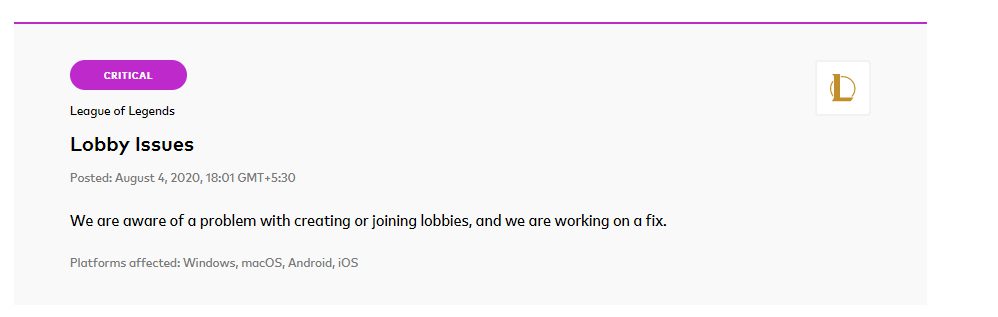
Update #2: Many of you have commented that the fixes aren’t working for you. There’s one more thing you can try. Try to uninstall League of Legends completely from your system. Shut down your computer, restart your internet, and then reinstall the game. This time, make a new account. If you’re able to login and play with the new account, logout and login with your main account. This should work. Please try this method and let me know in the comments section if this worked for you.
Also Read: League of Legends Ranked Down – Fix, Tricks, Guide [Solved]
Update: Since League of Legends new patches are coming, the game’s servers are getting too crowded. Let everything settle down and try playing during the night, the error should be fixed.
Easy Fix For Error 5C League of Legends (LOL Trouble Fetching Information Error)
Error 5C prevents you from starting normal and ranked games. It says – trouble fetching information for this player (Error: 5C). Affected players should quit and log back in if this persists.
The very common solution is a slow or buggy internet. If you’re facing internet issues, that might be the problem that’s triggering this Error.
- Try restarting your modem/router/internet connection
- Once you restart your internet connection, logout from your LoL account and re-login
- Start the game now and it should be fixed
Also Read: Samira League of Legends – Release Date, Abilities, and More
Multiple Accounts Error 5C
If you play with multiple accounts on your PC, here’s an easy fix.
- Logout from your current account
- Log in to your other account
- Logout and re-login to your current account
- The problem should be fixed
Error 5C League of Legends – Fix #2
There’s one more thing you can try –
- Logout of your account
- Uninstall League of Legends completely
- Disconnect your internet
- Shut down your PC and restart
- Download League of Legends and perform a fresh installation
- This time, make a new account
- With your new account, try to login and play a match
- If you’re able to play matches with the new account, logout of the new account
- Login with your main account
Hopefully, this should fix the issue.
Alternate Fix for Error 5C League of Legends
If both the fixes don’t work, try to use the League of Legends repair tool by clicking here.
If the problem persists, comment down below and we’ll try our best to fix it for you.
For more League of Legends content, stay with us, here at Spiel Times.
Make sure you subscribe to our push-notifications and never miss an update from the world of video games. Until next time, Stay Safe, Respect All Lives, and Happy Gaming!
Leave a Comment

Pingal
A gaming aficionado and an avid Dota 2 player, Pingal is the owner of Spiel Times and the main coordinator of the News section.
View all articlesRelated Articles
View All
Tokyo Game Show Marks 30 Years of Gaming Milestones, Launches, and Legacy
Tokyo Game Show (TGS) 2026 celebrates three decades of shaping gaming culture, bringing together players, creators, and the global gaming...
Xbox Responds to Game Pass 2027 Leak as Day-One Rumors Spread
No doubt, Xbox Game Pass could look very different next year, but one of the biggest rumored changes is already...

Xbox Revenue Falls 10% as Its New CEO Leads With Unflinching Honesty
Xbox revenue falls 10% year over year, putting CEO Asha Sharma’s turnaround strategy under scrutiny. Microsoft’s fiscal fourth quarter ended...
I did all that and still I have the problem
What kind of internet connection are you using?
samee. i use DSL
hello sir, how do you use the REPAIR TOOL. Ive installed and ran it already but now i dont know what to do. Please help
i have been doing the same but nah i still cant play
I did it all but still having a problem
I did all that and still I have the problem
I did all that but still not working
Tried it all. Still having the same issue. My ping is at a steady 28-29.
Wow so everyone started having this problem today omg
hellow so yeah i did everything but i still says the same thing and it also kicks me out every time ime trying to queue up please send help
I did all that but still not working
gg rito
same here same problem did everything not fixed
me too. i tried them. it happened only today . i don’t understand whats going on
i have tried all of the above, the issue was not resolved, i repatched the game and it was still not solved, i also tried using a vpn, no progress, i also tried logging into the same account on a different device on the same network, it worked normally after that, so i have confirmed that the problem lies in the device.
however it still does not work on my main device (just to clear things up)
i got this problem yesterday and i did it all and it does not work
I did all that but still not working
I did all that but still not working too
same I did it all and still not working. I can’t play. When I’m queuing and I got a match when I accept it the timer on the top right freezes and it says I declined too many games and I will get punished
.pls help
same i have tried everything its not working. i have 3 acc and i have the same problem on all
Still not working
Ggwp rito
Same thing for me …
Im having same problem come out of a ranked game and all went bad..
same
i still have the problem pls fix it because i am addicted to the game
wtf
Iv tried everything tried on a different device logging in also and still nothing.. repair tool router restart log on and off 2 diff accounts.. !!
Can someone help i tried all of this but it is not helping.
Check Update #2
Was ist das den fürn Aufwand, nur um League normal zu zocken?
(Patch 10.15)
The client gave me this error, so I restarted the client. I noticed that it removed all my eternals so I panicked.
I restarted the game again and it says I can’t access anymore. I disinstalled the game and it kinda fixed it, but I still don’t have my eternals anymore.
dont worry about it ,riot have a problem they say ,”wew fix it :)) ,
bendede aynısı oluyo giremiyom hepsini denedim.
“Easy Fix”, however riot just released a statement saying that the game is bugging and they’re trying to fix it now. I think you should change your title haha
i tried all of this every day for 4 days now and nothing works..
wtf is that