
Fortnite Download on Android Device – All You Need To Know
The original frenzy that engulfed Fortnite since it first arrived in 2017 has passed us by, but the main factor for it hasn’t. Simply put, it’s still an entertaining and addictive game! Now it’s not only playable on PlayStation, Switch, and Xbox. You can now also play it using your Android phone!
Fortnite On Android
- Go to mobile browser.
- Enter Epic Games website.
- Tap the Download button.
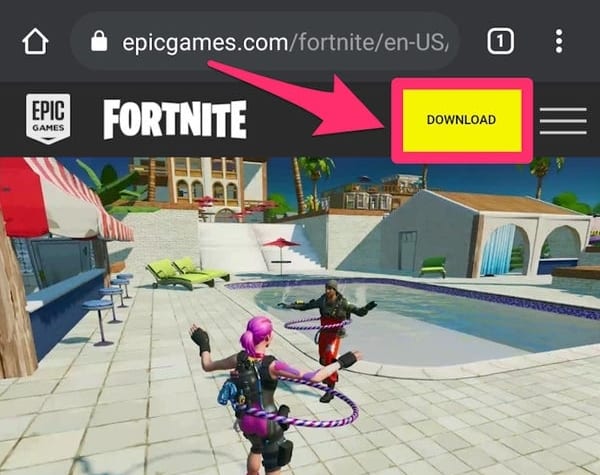
- Wait for the download prompt.
- Select Open to start installing.
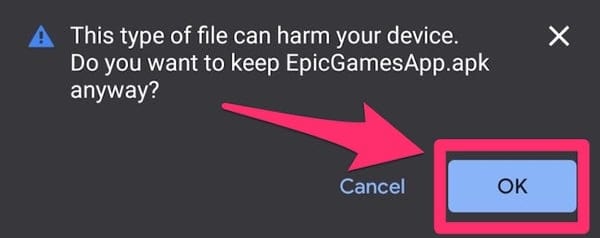
- If a warning appears, ignore it and tap OK to continue.
- In case you get another warning:
- Tap Settings, seen on the warning message.
- You’ll be prompted to your phone’s Settings menu.
- Select “Allow from this source”.
- Return to the browser and Install.
- Another pop-up message will appear.
- Select Download again and tap Open when finished.
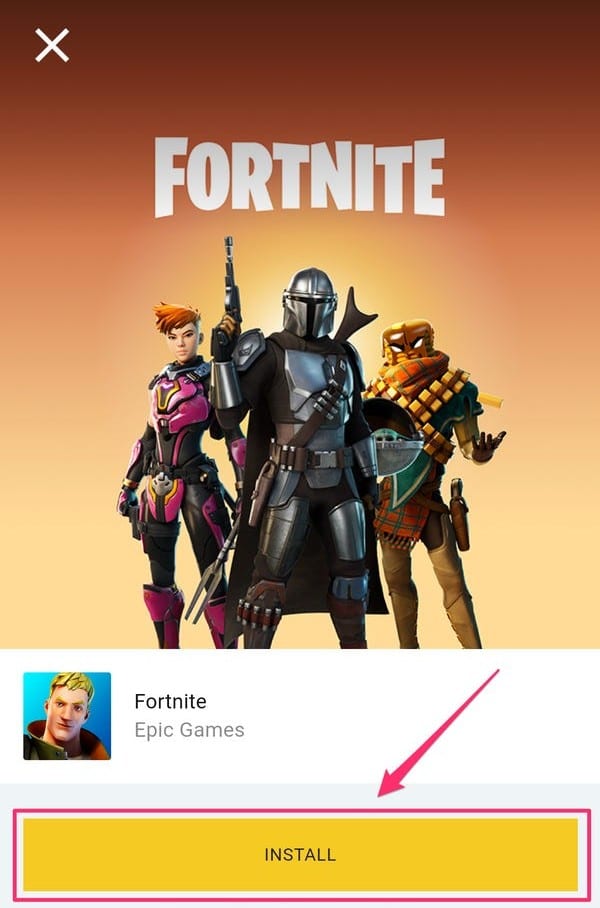
- Tap Install.
If you have any questions regarding Fortnite, feel free to ask in the comments below. For more content related to Fortnite, stay with us, here at Spiel Times.
Make sure you subscribe to our push-notifications and never miss an update from the world of video games. Until next time, Stay Safe, Wear A Mask, and Happy Gaming!

Marcus Kade
Marcus Kade is Managing Editor at Spiel Times, covering breaking gaming news with a focus on the industry's business side. When not writing, he's probably losing a co-op game to his partner.
View all articlesRelated Articles
View All
GTA 6 Hits Brooklyn With New Mural and Miami Heat Vice City Tie-In
Grand Theft Auto VI is bringing Vice City beyond trailers and screenshots. On October 1, fans spotted a large GTA...

Capcom Hints at More Resident Evil Remakes Ahead of Planned Crossover
Capcom has bigger plans for Resident Evil than simply bringing its older titles back with modern graphics. The publisher is...

Tokyo Game Show Marks 30 Years of Gaming Milestones, Launches, and Legacy
Tokyo Game Show (TGS) 2026 celebrates three decades of shaping gaming culture, bringing together players, creators, and the global gaming...