
How to Link Pokemon Go To Nintendo Account in 5 Easy Steps
If you want to transfer your Pokemon from Pokemon Go to Pokemon Home, you need to have a connected Nintendo account. Now, many are facing issues with how to link Pokemon Go to Nintendo Account. Follow these easy steps to link and transfer your Pokemon.
How to Link Pokemon Go To Nintendo Account
Following are the steps to link Pokemon Go to Nintendo account –
- Create a Nintendo Account if you don’t have one already
- Open Pokemon Go and tap the Poke Ball at the bottom
- Click on Settings
- Select Pokemon Home from the Settings Menu
- Tap Sign In
- Your Pokemon Go and Nintendo Account will now be linked
First off, you’ll need a Nintendo Account. If you have one already, you can skip this step. If you don’t have one, click here to create a new account.
Next, follow the steps mentioned above. Here are a few images to help you guide through the process –
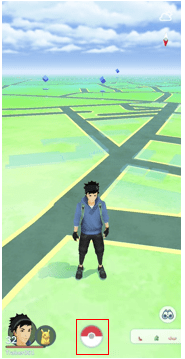
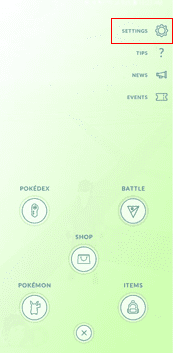
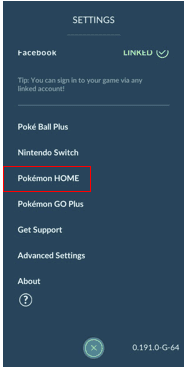
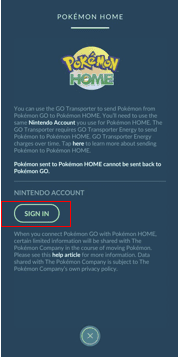
For more content on Pokemon Go, stay with us, here at Spiel Times.
Make sure you subscribe to our push-notifications and never miss an update from the world of video games. Until next time, Stay Safe, Respect All Lives, and Happy Gaming!
Leave a Comment

Pingal
A gaming aficionado and an avid Dota 2 player, Pingal is the owner of Spiel Times and the main coordinator of the News section.
View all articlesRelated Articles
View All
GTA 6 Hits Brooklyn With New Mural and Miami Heat Vice City Tie-In
Grand Theft Auto VI is bringing Vice City beyond trailers and screenshots. On October 1, fans spotted a large GTA...

Capcom Hints at More Resident Evil Remakes Ahead of Planned Crossover
Capcom has bigger plans for Resident Evil than simply bringing its older titles back with modern graphics. The publisher is...

Tokyo Game Show Marks 30 Years of Gaming Milestones, Launches, and Legacy
Tokyo Game Show (TGS) 2026 celebrates three decades of shaping gaming culture, bringing together players, creators, and the global gaming...
What happens if you don’t have a Nintendo
I did this and it still won’t link