
Monopoly GO: Unable to Connect Facebook Account | Possible Fixes
We know how frustrating it can be when you can’t access the precious progression data from your favorite game. Many Monopoly GO players are facing this same exact problem where they are unable to connect to their Facebook account. As a result, they are missing out on the daily login rewards on top of being unable to play the game. But you don’t need to worry if you are one of them; we have brought a few possible fixes that just might be able to solve the issue. Make sure to try them out for yourself after going through this article.
How to Connect Monopoly GO to Facebook
First of all, let us look at the process of connecting the game to your Facebook account. The steps are quite simple.
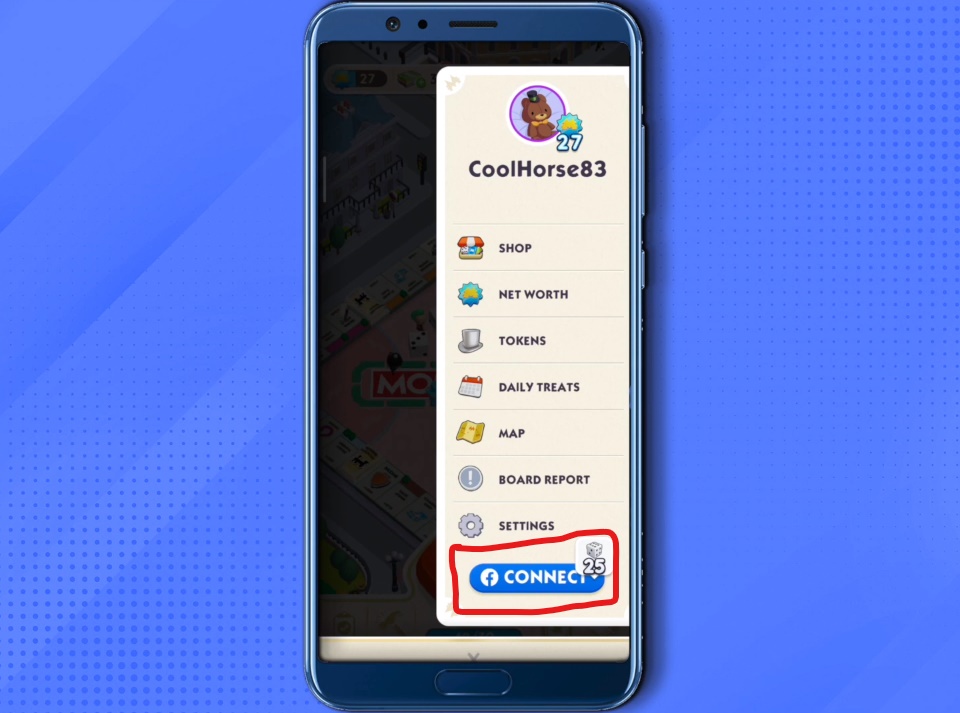
Screengrab Courtesy of Digital Navigator via YouTube
- Tap on the symbol of three horizontal lines located at the top-right corner of the in-game screen.
- You can spot a Facebook connect button at the bottom of the list.
- Click that button and press Confirm to provide the necessary permissions required by the social media app.
- Next, you will be redirected to the official log-in page of Facebook. From there, sign in to your account by providing the appropriate user details.
- Now, your Facebook account is officially connected with Monopoly GO.
Unable to Connect Monopoly GO with Facebook Account: Possible Fixes
There are a few possible fixes that you should try in order to solve the problem. They are listed below.
Make sure to check the following
- Ensure that you have a properly working data or wi-fi connection for internet access.
- Enter the correct account details when you are attempting to log in. It’s also important to ensure that there are no issues with your Facebook account. For example, you will face this problem if your Facebook account has been accidentally deactivated or restricted by the company due to guideline issues.
Courtesy of Scopely
- Check for any updates both on your Facebook and Monopoly GO. Provide the update if any one of these applications needs it.
- The error might also occur due to a server problem on the end of both Monopoly GO and Facebook. If this is the case, wait a few hours for the server to get fixed.
Restart your App or Device
- For the first step, try out the good old Restart to achieve your goal.
- Force close the application and then open it up again from your mobile phone.
- If that does not work, restart your mobile device by switching it off and turning it on.
Uninstall and Re-install the Applications
- Uninstall the applications and re-install them again from the App Store or the Apple Store.
- Try to repeat the login process once they are reinstalled.
Allow the Necessary Permissions
- Make sure that you are providing all the pre-requisite permissions for the task.
- In the case of both Android and iOS, make sure that you have allowed your Facebook to sign into third-party apps. You can also try resetting the privacy settings for the app on your device.
- Once that is done, you can launch the game and see if it solves the problem.
How to remove Monopoly GO from Facebook
Lastly, you can try unlinking Monopoly GO from Facebook. Afterwards, you should try to re-login with the process mentioned at the very beginning of this article. The method of removing the game is provided below.
- Go to the Settings and Privacy Menu from Facebook.
- From there, head over to the Apps and Websites option.
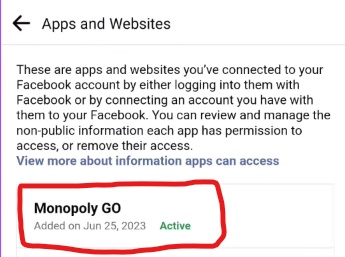
Screengrab Courtesy of MNtechwork via YouTube
- There, you will find the option of Monopoly GO.
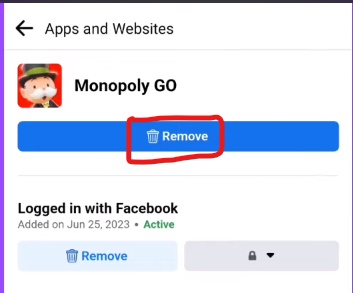
Screengrab Courtesy of MNtechwork via YouTube
- Click on it and press Remove to unlink it from Facebook
- Then, attempt to re-login from the Monopoly GO application.
Contact the Customer Support at Scopely
We really hope that the fixes above will work out for you. However, if the problem persists, you should reach out to the official customer support of Scopely and explain your situation to them.
We are sure that they would be able to figure out the exact technical problem and solve it with efficiency.
We hope you have successfully connected your Facebook account with Monopoly GO. Did these fixes solve the problem, or are you still trying to figure it out? Let us know in the comments below.
For more content, stay with us here at Spiel Times. Make sure you subscribe to our push notifications and never miss an update. You can also follow us on Spiel Anime, Twitter, Instagram, and YouTube. Until next time!
Leave a Comment

Icon Roy
Icon is just a guy trying to live up to his literal name. He is a Journalism graduate who decided to take on a new journey- writing about video games. You will mostly find him watching YouTube videos related to games when he is not playing or writing about them.
View all articlesRelated Articles
View All
The unlikely CEO behind GTA VI has a game plan of his own
Strauss Zelnick is not the obvious face of Grand Theft Auto VI, and that is what makes him fascinating. The...
No Verification Casino UK 2026: Best No KYC Casino Sites
No verification casinos offer UK players quick access to online gambling and casino games without extensive KYC checks. Experience instant...
Casinos not on GamStop UK: Best Non GamStop Casinos 2026
Casinos not on GamStop are popular among UK players because they offer access to games despite GamStop restrictions and boast...
Hi there. I’ve been having lots of issues with monopoly not opening the account linked to Facebook. I still don’t have a solution but wonders if it could be because I mistakenly removed the email on Facebook (when you are on fb apps and website tab, there is an option to remove email and I hit that).
I can’t bind my facebook its always creating a new one after uninstall and disconnect my fb