
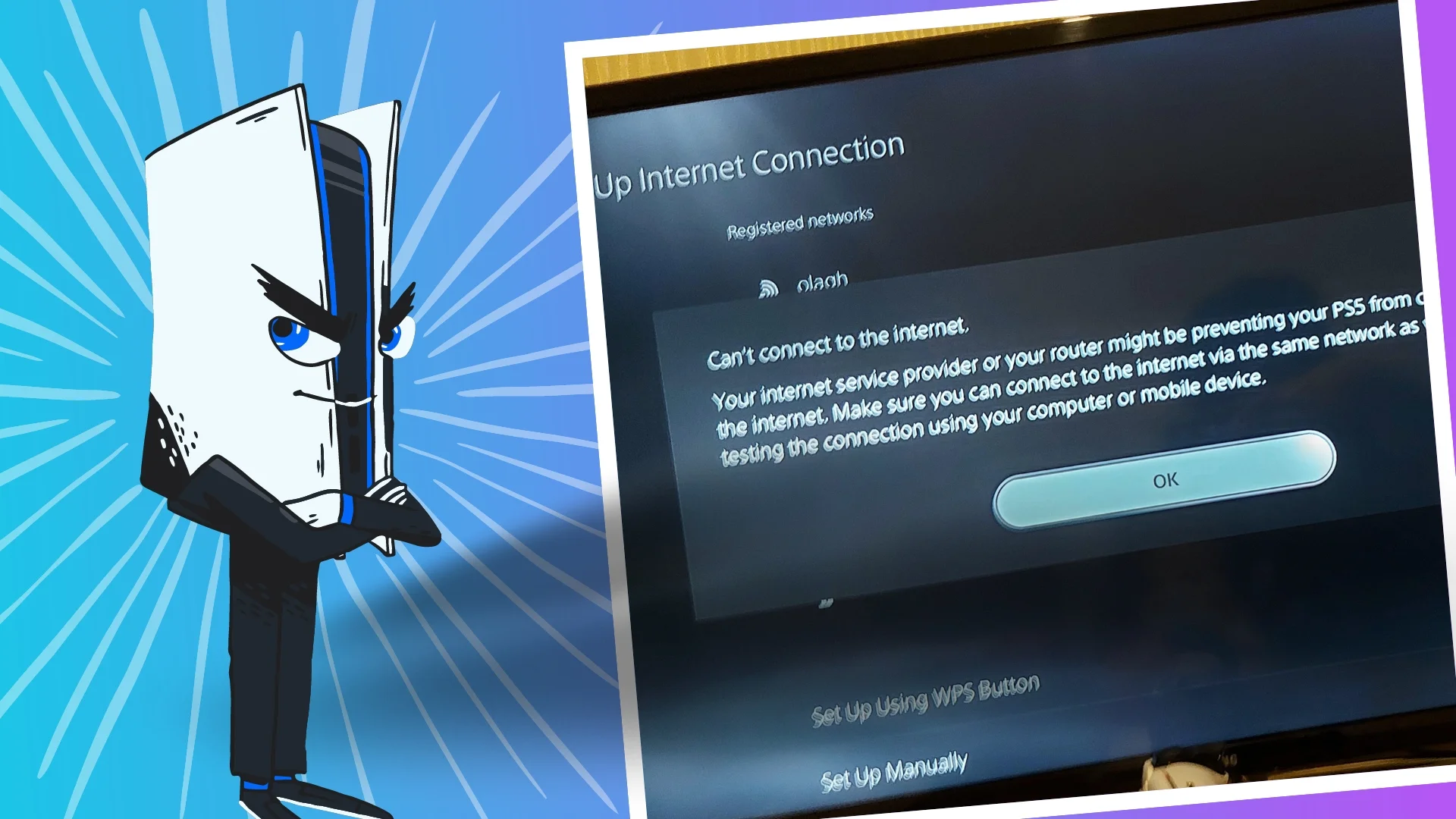
PS5 Not Connecting to the Internet? Troubleshooting Guide & Fixes
Is your PS5 giving you the silent treatment when it comes to the internet? That’s a bummer, especially when you’re online gaming or streaming an action-packed game. But don’t worry too much. We’ve got your back with this handy-dandy troubleshooting guide.
Before we dive in, let’s figure out what’s causing the issue:
Maybe your Wi-Fi router is taking a nap, or your internet provider is throwing a tantrum.
Sometimes, Sony’s servers need a time-out, too. It happens to the best of us. Even the most advanced tech can have a glitch or two.
Possible Fixes
- PSN Status: Head over to the official PSN status page (link it) and see if there are any reported outages. If it’s down, you’ll just have to wait it out.
- Router / Connection: Unplug your PS5, router, and modem for about 30 seconds each. Then, plug ’em back in and see if that digital CPR does the trick. Can your phone or laptop connect to the internet? If not, the problem is not with your PS5—it’s with your network. If you can, connect your PS5 directly to your router with an Ethernet cable. It’s like giving your console a direct line to the internet buffet.
- PS5 Network: Head to Settings > Network > Test Internet Connection. If it fails, try manually setting up your Wi-Fi. If your PS5 is struggling with the 5GHz band, try switching to the 2.4GHz band in your router settings.
- System Update: Go to Settings > System > System Software > System Software Update and Settings. Maybe your PS5 just needs a little digital boost.
- Reset Settings: This is the nuclear option, so only do it if nothing else works. It’ll erase your saved Wi-Fi passwords, so be prepared to re-enter ’em.
Troubleshoot not working?
Google’s public DNS might be the answer. Try using Google’s public DNS (8.8.8.8 and 8.8.4.4) in your PS5‘s network settings. If all else fails, it might be time to call in the professionals.
Remember, patience is key here. Don’t give up on your PS5 just yet! With a little persistence and these tips, you’ll be back online and fraggin’ your friends in no time. Now, get back in the game!

JC Paredes
Since March 2021, I've worn two hats at Spiel Times: a writer and a Managing Editor. In my writing role, I've earned recognition from Wikipedia and Nev Schulman (Catfish TV Show host) for my insightful analysis and engaging narrative style. I'm passionate about all things gaming, with a keen eye for detail and a knack for uncovering hidden secrets within games. My gaming journey began at a young age, captivated by titles like Resident Evil and Tomb Raider. Today, I enjoy exploring open-world RPGs and MMORPGs, consumed by their lore and crafting theories about their narratives. I'm also drawn to the suspenseful atmosphere of horror games and the intricate narratives of crime-themed titles, bringing a unique perspective to my writing. Beyond gaming, I have a fascination with anything unexplained and chilling, a passion that often spills over into my exploration of horror games. When I'm not engrossed in a virtual world, you can find me curled up and spending time with my adorable doggy sidekick, Teemo. As Managing Editor, I'm committed to fostering a collaborative and supportive environment for our writing team. I communicate openly with my team members, addressing any content-related issues and providing guidance to help them excel.
View all articles
Dell Gaming Laptops: The Smart Choice. Why the G-Series is the Wise Gamer’s Secret Weapon
We are living in a golden age of PC gaming. Games are more beautiful, more complex, and more immersive than...

Sims Rival InZOI Announces Official Release Date After Unexpected Delay
The highly anticipated life simulation game InZOI has officially announced its Early Access release date after an unexpected delay, much...
AMD Ryzen 7 9800X3D Sells Out as Scalpers Surge Prices to $999
The AMD Ryzen 7 9800X3D, the latest in AMD’s lineup of high-performance gaming CPUs, has sparked a frenzy among enthusiasts...