
How to Link Pokemon Go To Nintendo Account in 5 Easy Steps
If you want to transfer your Pokemon from Pokemon Go to Pokemon Home, you need to have a connected Nintendo account. Now, many are facing issues with how to link Pokemon Go to Nintendo Account. Follow these easy steps to link and transfer your Pokemon.
How to Link Pokemon Go To Nintendo Account
Following are the steps to link Pokemon Go to Nintendo account –
- Create a Nintendo Account if you don’t have one already
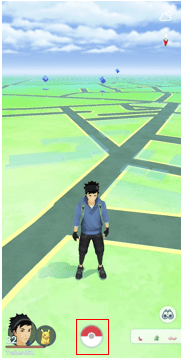
- Open Pokemon Go and tap the Poke Ball at the bottom
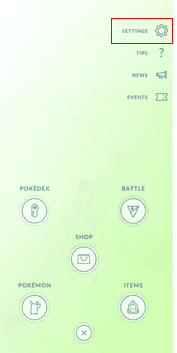
- Click on Settings
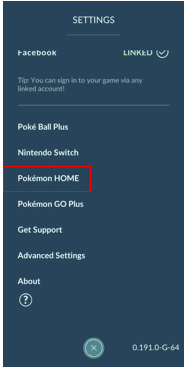
- Select Pokemon Home from the Settings Menu
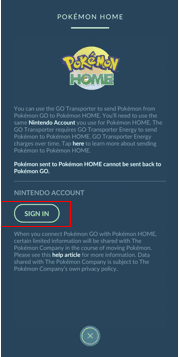
- Tap Sign In
- Your Pokemon Go and Nintendo Account will now be linked
First off, you’ll need a Nintendo Account. If you have one already, you can skip this step. If you don’t have one, click here to create a new account.
Next, follow the steps mentioned above. Here are a few images to help you guide through the process –
For more content on Pokemon Go, stay with us, here at Spiel Times.
Make sure you subscribe to our push-notifications and never miss an update from the world of video games. Until next time, Stay Safe, Respect All Lives, and Happy Gaming!
Leave a Comment

Pingal
A gaming aficionado and an avid Dota 2 player, Pingal is the owner of Spiel Times and the main coordinator of the News section.
View all articlesRelated Articles
View All
AI-tagged releases surge on Steam as developers compete for attention
Steam’s release feed is busier, and AI is part of the story. By November 7, 2026, 10,941 of 27,138 games...

Anthropic tightens Claude’s rules to stop AI game cloning, but developers face new challenges
AI is making video game creation faster and easier, but it’s also raising copyright concerns. While developers welcome the convenience,...

Indian superstar Mahesh Babu backs new action-adventure game targeting 2028
India’s gaming industry is attracting fresh attention as more developers look beyond mobile entertainment. While smartphones have traditionally dominated the...
What happens if you don’t have a Nintendo
I did this and it still won’t link